I’ve looked at several options for making sure I “use my time wisely” while I’m on the computer including:
- Onlife (Mac only)
- The Printable CEO
- Timers that capture screenshots such as TimeSnapper or block programs such as Temptation Blocker (Windows only)
- Project timers such as On The Job and Billings2 and Billable (all Mac Only)
- Various non-free online timers… maybe I’m cheap but 5 to 9 dollars a month is 60 to 108 dollars a year and that’s a lot of cash to fork out for a timer (at least for personal use). These include Harvest, 14dayz, Time59 and Tick.
- Firefox Extensions that track time such as TimeTracker.
None of them fit my criteria of being easy to use, easy to see where my time went (some type of reporting) and inexpensive. Then I went back to SlimTimer. The concept is simple. You open up a little window that sits on your desk all day (I open mine in Safari so tabs don’t accidentally pop up there from my default browser, Firefox) and click the name of the activity you’re doing at the time. That’s it. Here’s my window right now.
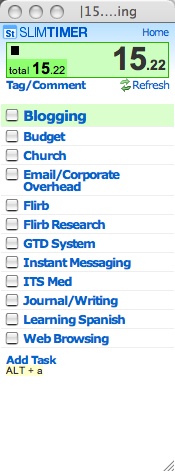
When you’re done you close the window, click another task or toggle the task you’re on. Then the cool part is the reports that are available on the main SlimTimer website. You can see where your time went specifically for the day, week month, per task, tag etc. Here’s a screen capture of a report:

SlimTimer is simple, powerful, quick and free. Can’t beat that.
Technorati Tags: gtd, lifehacks, timetracking, software, technology, web2.0, webservices
6 replies on “SlimTimer – The Best Timer for GTD”
I appreciate the positive review, I’m really glad you’re finding it as useful as I do. Let me know if you have any ideas on what can be improved.
Hi Marcus, Thanks for mentioning Time59. I’d just like to point out that Time59 is only $19.95 PER YEAR for unlimited use. Chris Monaghan
Chris, Danny – Thanks for the clarifications. I think both Harvest and Time59 are great values for corporations or people who are using them to track billable hours. For GTD type tracking of all activities I'm doing on the computer neither is feasible. I'm tracking 13 "projects" right now–for Harvest that'd put me in the $15 a month plan.
Time59 is a little different-the price isn't too bad, but there is no real timer functionality. It has to be entered manually.
Again, I'm sure these are both great tools in their sphere, but for GTD time tracking, I think SlimTimer is much better.
Just to let you know, Harvest offers a free plan for one user to track 3 projects. And we’re just getting ready to ship out a Mac OS X widget to go along with Harvest… if you’d like to try out our widget before our official release, drop me a line and I’ll send it over. Here’s some info on where we’re going with things:
http://news.getharvest.com/articles/2006/11/17/api-and-widgets
Cheers!
Thanks for the tip. I’m giving Slimtimer a try. It has helped me out a lot in tracking the time I spend at home on billable work. It has also helped me better estimate accurate schedules the various types of houses that I design.
19.95 a year is less than most spend on starbucks in a week. I don’t think you can knock TIME59.COM not only on price but as far as functionality it is very easy to use, intuitive, and well thought out to customers needs. Plus it seems to be upgraded constantly.